


  • Home
  • Projectors
  • HY320 Smart Projector 300 ANSI Lumens – Android, Wi-Fi, Bluetooth, 1080p Support, Home Cinema

HY320 Smart Projector 300 ANSI Lumens – Android, Wi-Fi, Bluetooth, 1080p Support, Home Cinema

50 $
Item added to cart View Cart Checkout
Item added to wishlist View Wishlist
Item removed from wishlist

The HY320 is a compact smart projector that works as a complete home cinema in a single unit. It runs Android, so you can open streaming apps directly on the projector, and it supports dual-band Wi-Fi and Bluetooth for wireless connection to a phone, speaker or headphones.

The rated 300 ANSI lumens is a real, standardised brightness measurement, which makes it more meaningful than the very large LED lumen numbers used on cheaper models. It supports 1080p content and a keystone and rotating stand help you aim the picture without moving furniture.

It is a good fit for bedrooms, student rooms and small living rooms where you want a large picture without installing a fixed projector.

Key Features of the HY320 Smart Projector 300 ANSI Lumens

  • 300 ANSI lumens – standardised brightness figure for a clear picture in a dim room.
  • Android system – install streaming apps on the projector itself.
  • Wi-Fi and Bluetooth – connect wirelessly to phones, speakers and headphones.
  • 1080p support – accepts full HD content for sharp video.
  • Tilting design – adjust the angle to project onto a wall or ceiling.
  • Compact body – easy to move between rooms.

HY320 Smart Projector 300 ANSI Lumens Specifications

Model HY320
Brightness 300 ANSI lumens
Supported resolution 1080p
Operating system Android
Connectivity Wi-Fi, Bluetooth, HDMI, USB

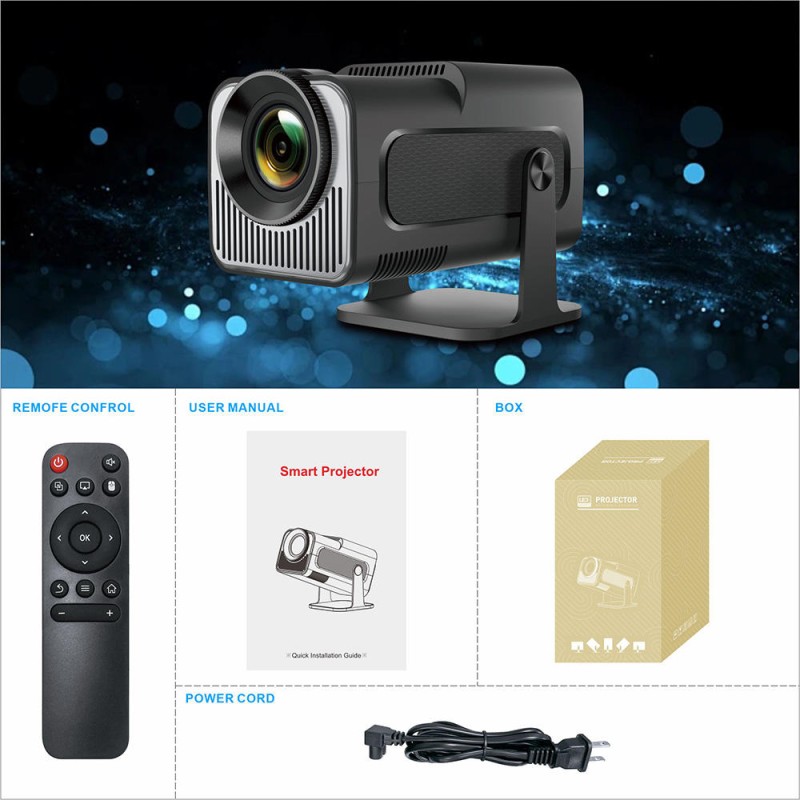
What Is in the Box

  • HY320 projector
  • Remote control
  • Power cable
  • User manual

Good to Know

  • Projector brightness figures vary between brands, so view in a dim or dark room for the best contrast and colour.
  • Image size depends on the distance between the projector and the wall or screen; move it back for a larger picture.
  • Keep the vents clear and let the fan run for a short time after switching off.

Buying Guide

How to choose a projector: look at brightness, resolution and the room. A brighter projector copes better with ambient light, while a dark room allows a lower brightness rating to look good. Native resolution decides sharpness; a unit that accepts 1080p input will still look best when projected at moderate screen sizes. Built-in apps and Wi-Fi remove the need for an extra TV box.

Placement matters: the farther the projector sits from the wall, the larger the picture. Use a plain white wall or a projection screen for best colour, and leave space around the vents for airflow. Connect speakers or a soundbar if you want louder sound.

Maintenance: keep the lens clean with a soft cloth, let the fan finish cooling before unplugging, and store the unit away from dust.

You may also like

Clear Filters
Hy300 4K Projector with Bluetooth and Dual WiFi
30 $
A10 Smart Projector – 1080p Support, Wi-Fi, Android System, Portable Home Cinema
60 $
Item added to cart View Cart Checkout
Item added to wishlist View Wishlist
Item removed from wishlist
Best Rated
Hot Deals
Popular This Week